

Collaborate
The simplest + quickest way to have us access a site (when we requested it for support or troubleshooting) is to add us as a collaborator on BigScoots.
If you are on the BigScoots Console instead of BigScoots WPO, use this tutorial and add hello@feastdesignco.com as an administrator.
To add Feast as a collaborator in BigScoots WPO:
- open your BigScoots WPO login
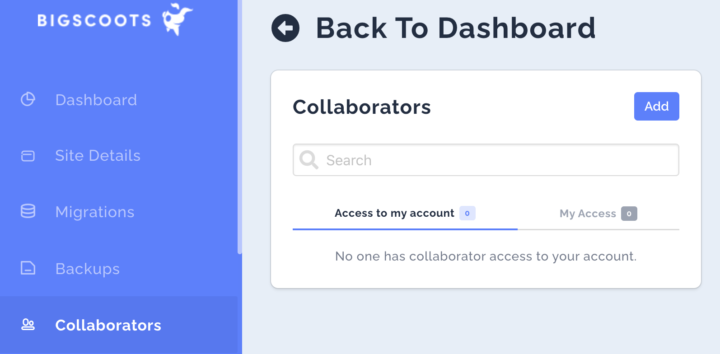
- under "Collaborators" page in the left menu, click "Add":
- use "hello@feastdesignco.com" first, then
- Click "Custom Access" (IMPORTANT!) and select the sites you want us to access
- Note: if you're on the new "Console" version, simply assign us as an admin
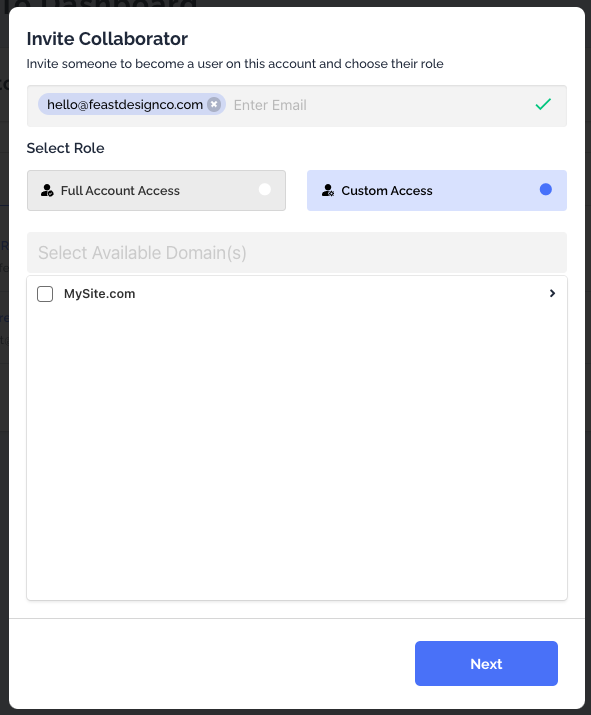
- Click Next then set only the permissions below.
- Skip this if on the new "Console"
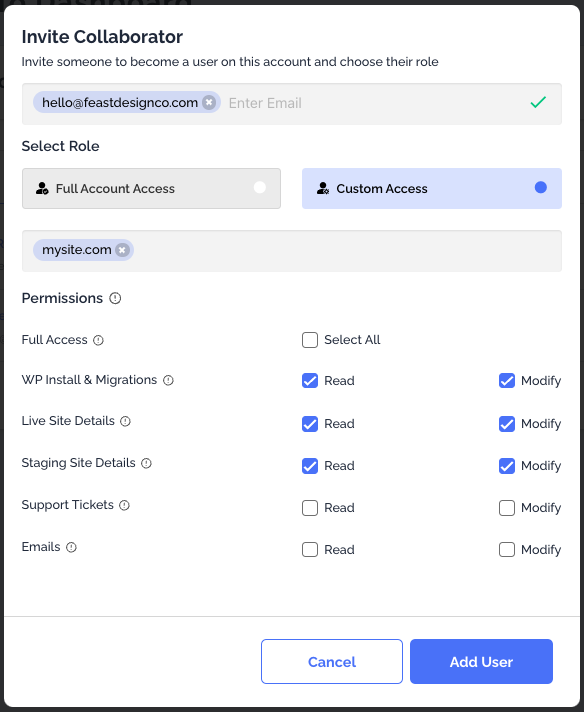
Note: do not add us to support tickets or emails.
- click "Create"
- reply to your support ticket or order confirmation email to let us know this is complete