

Kadence Spacing

Kadence Spacing
Kadence has a number of places that you can adjust the spacing on your site. We strongly advise against changing this spacing as it can impact ad density, ad viewability, and cause layout issues.
Using the customizer to change our default theme settings creates a custom theme that Feast can not offer support for.
Always check the mobile version of your homepage, posts and categories on a mobile device when making changes.
If changes aren't showing on your mobile device, you need to clear your cache.
Jump to:
Important considerations
The spacing on your site, especially between blocks, will affect your ad density and viewability.
More spacing means more ads inserted into content, which negatively impacts user experience.
Lower spacing means fewer ads inserted into content, which means lower RPMs (fewer ads get shown).
We strongly recommend leaving the spacing at our theme defaults.
Global Kadence spacing
We introduced a new customizer page to adjust the Kadence global spacing variables, because Kadence provides no way to modify these.
However, only the Kadence MD Spacing is used for content blocks:
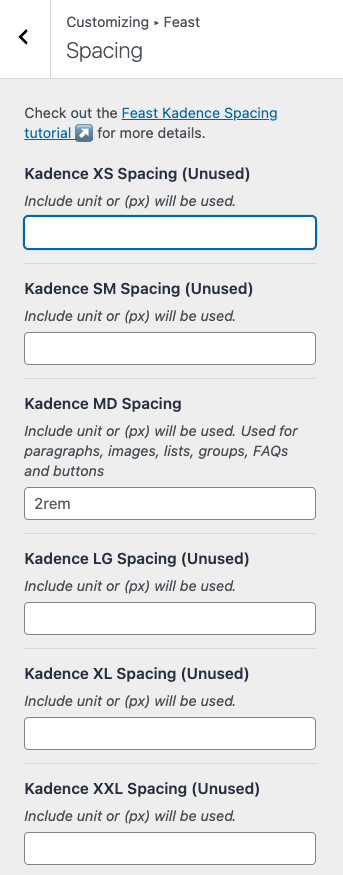
The rest are there in case there's a future need and should not be used.
Note: the Kadence Edge Spacing (Warning) is actually active, but may cause major display issues if used.
Block spacing
The majority of block-level elements use the Kadence MD Spacing for margins, set at 2rem. These blocks include:
- Paragraphs
- Images
- Lists
- Groups
- FAQ
- Buttons
- FSRI block
- FSCI block
- Breadcrumbs
- Modern Prev + Next
- Advanced Jump To
Button spacing
You can adjust the spacing between buttons in Customizer > Colors & Fonts > Buttons > Padding
Header spacing
You can adjust the spacing in the header by going to Customizer > Header and clicking on the blue gear icon for that row:
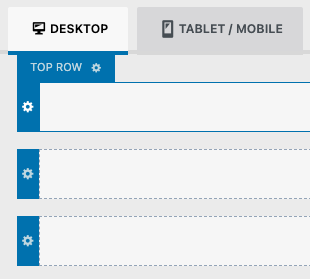
This opens setting in the left sidebar for Min height under General, and if you click the Design tab:
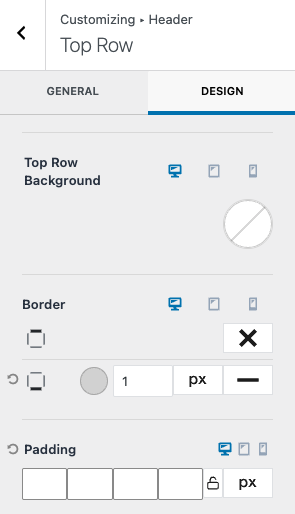
You get options for padding as well as borders.
Sidebar spacing
The sidebar is controlled by the Modern Sidebar.
Footer spacing
The footer is controlled by the Modern Footer.